Control it from the strings
Leave a note ringing and feedback blooms. Keep riffing and it ducks under your playing. Mute the strings with your palm and it dies, the same move as on stage.
Guitar feedback you can summon on demand. It listens to what you play and synthesises the feedback from scratch: singing sustain without the amp, the volume or the room.

A guitar take through Feedback Emulator, with the plugin panel on screen so you can see the settings.
The video loads from YouTube when you press play.
One guitar phrase, three stages: raw DI, through an amp, then with Feedback Emulator in front of that amp.
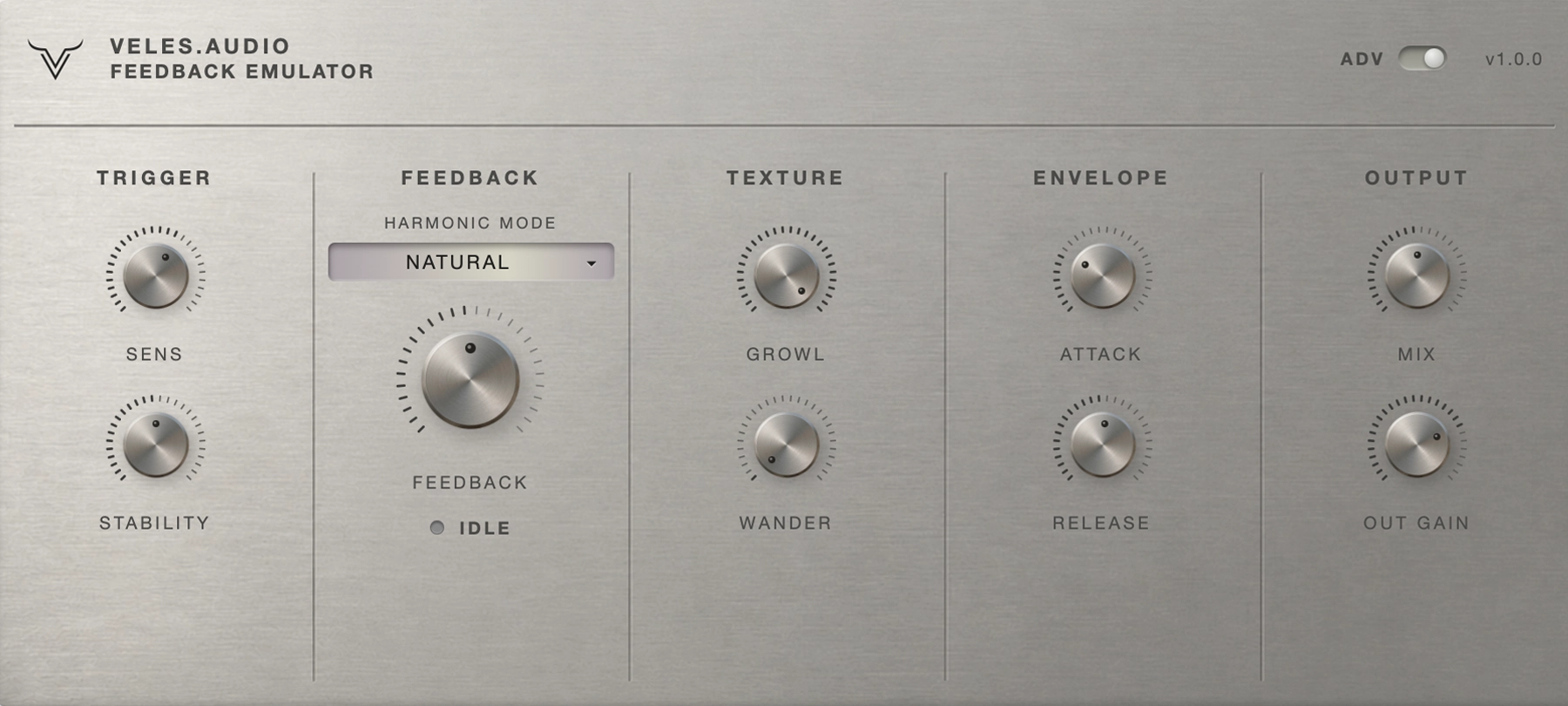
Feedback, Texture, Envelope and Output run the everyday view: which harmonic sings, how it growls and drifts, how fast it blooms and how loud it sits. The ADV toggle, switched on here, adds the trigger controls and output trim.
Leave a note ringing and feedback blooms. Keep riffing and it ducks under your playing. Mute the strings with your palm and it dies, the same move as on stage.
Four harmonic modes pick what sings: natural overtones, a thick fundamental drone, the classic octave squeal or piercing upper harmonics.
The character knobs. Growl adds snarl that thickens as the feedback swells, Wander lets a long note drift and breathe. No two sustains repeat.
Free for personal and commercial use. No trial, no upsell. The first plugin from veles.audio.
They filmed these on their own rigs.
It’s a simple, easy-to-use plugin that might just convince you that you’re Jimi Hendrix at the Monterey Pop Festival if you close your eyes; just don’t set your guitar on fire.

Veles Audio’s Feedback Emulator is a plugin that recreates very realistic amp feedback while keeping the controls simple.AZU Soundworks (opens in a new tab)
Its biggest strength is not size or complexity, but concept: it gives direct guitar recordings a way to bloom like they are interacting with a loud amp.Audiartist (opens in a new tab)
Entered in the KVR Developer Challenge 2026 (opens in a new tab)
Yes. It’s free for personal and commercial use. There’s no trial and no paid version.
Yes, a free veles.audio account. Claim the plugin once and it stays in My plugins, where you download the installer and every update.
Windows 10 or 11 (64-bit) or macOS on Apple silicon or Intel, a DAW that loads VST3 or AU plugins and a guitar going in as a clean DI signal. It’s built for a mono guitar track.
Yes. The macOS build runs as VST3 or AU on Apple silicon and Intel Macs.
Any DAW that loads VST3 or AU plugins, including Reaper, Cubase, Studio One, Ableton Live, FL Studio and Bitwig Studio. On a Mac, Logic Pro and GarageBand load the AU version. Pro Tools only loads AAX, so it can’t run Feedback Emulator.
No. The plugin creates the feedback itself instead of looping your signal, so it works in headphones at any volume, with any amp sim after it.
First, on the clean DI track, before the amp sim and any drive or compression. It reads your pitch and dynamics, and a distorted signal confuses it.
Single notes work best. On a chord it locks onto the strongest note you play and feeds back on that one.
An EBow or a sustainer pickup drives the string with a magnet and needs hardware on the guitar. Feedback Emulator works on the audio in your DAW, so it also works on a DI part you recorded earlier.
Feedback Emulator is free, forever. Drop it on a DI track before the amp sim, pick a preset and let a note ring.